Tips for Being a Good Podcast Guest

Guesting on podcasts is a great marketing tool. Whether you're promoting your own show, a business, or simply yourself, jumping on someone else's show can get you in front of a new audience that can help you grow.

There are a lot of prospective podcast guests out there, so you want to put your best foot forward. Coming prepared can help make the experience better for you, the host, and the audience. Not to mention, it can help cut back any nerves you might have. 

Why become a podcast guest?

Being a guest on your favorite podcast, or one that's relevant to whatever niche you operate in is a great opportunity. Not only does it give you an opportunity to potentially expand your audience, but it's also a ton of fun!

But there are a few things that you can do that will make the experience better for you, the host, and the audience. These eight tips aren't hard to implement, but they can definitely make the experience better for everyone. 

1. Come prepared

Showing up prepared is crucial, especially if you have something that you need to get out there. If you're a first- (second-, or even third-) time podcast guest, preparing can also help you feel a little more comfortable about being interviewed.

How can you prepare to be on a podcast, you ask? There are a few easy things you can do:

Listen (or watch) the podcast beforehand

There is little that's more uncomfortable than showing up to the party and realizing you wore your PJs but everyone else is dressed up in spooky costumes. Showing up to a podcast you're not familiar with can carry the same feeling.

Take an opportunity to listen to the show that you're about to go on. Not only can this help you familiarize yourself with the show, but it can also:

  • Give you an opportunity to get to know the host

  • Figure out what kind of questions you could be asked

  • Discover how interviews are conducted

  • Get overall feel and tone of the show

  • Become familiar with the show’s format

It's also important to note that if you haven't checked out the show beforehand, it'll probably be easy for the show's host to tell. Not the best impression for them or their audience. 

Jot your message down 

You don't want to come off as rigid or overly scripted, but there's nothing wrong with having notes prepared beforehand. In fact, it's highly encouraged.

While you want your podcast interview to be casual, comfortable, and not too formal, having notes to reference can make you more comfortable. Even if you don't look at them once, having them there can give you the confidence that you've got a backup. 

When we say "jot" we really mean write — just create a list of things that you want to make sure you cover, and a few answers to regular questions the host asks (which you can only know in advance if you listened to their show). 

It's also helpful to write down a few things that you want to tell the audience about yourself. It's not that you don't know anything about yourself but talking about yourself is one of the most uncomfortable parts of guesting for a lot of people and writing these points down beforehand can help you remember what you want to share. 

2. Turn off your phone

Your phone ringing in the middle of your podcast interview could make it particularly awkward. 

A great practice is to make sure your phone is completely turned off or silent while you're doing an interview. While you could turn it to vibrate, if it's sitting on the table next to you, it's possible it could still be heard — so avoid that scenario where possible.

Most podcasters use different tracks for every participant but cutting out your cell phone buzzing is still challenging — especially if you're the one talking when it happens.

3. Show up... on time

It doesn't get more basic than showing up and doing it on time, and while it might be obvious it's worth saying. 

Arranging to bring guests on your show can be a stressful and complex job — and it would surprise you how many people cancel or simply don't show up. If you've committed to show up on a podcast, show up. Chances are the creators are counting on your episode to be part of their schedule, and if you drop out at the last minute they'll need to scramble to replace you.

Beyond showing up, doing it on time is even better. Your time is precious and so is the host’s, so do everything you can to show up — whether it's virtually or in-person — on time.

4. Stay on topic

Admittedly, this can be easier said than done, but staying on topic both helps keep the editing minimal and keeps the audience happy. It's OK — and often welcome — for you to tell relevant stories and go into detail, but don't get too far off track. 

One of the biggest challenges of being a host is keeping the show on track and making sure the half-hour episode doesn't take two hours to record. While that's definitely the host's job, you can help them out by not getting too far off course. 

5. Use the right gear (if you've got it)

No one expects you to go out and buy a bunch of gear to attend an interview. But if hopping on podcasts is a regular thing for you, getting yourself proper equipment isn't a bad idea. 

The best podcast quality comes from recording with a pair of headphones and an external mic. There are countless tools you can purchase for this, but getting something affordable that works for you is perfectly fine — there's no need to go out and spend a fortune. 

6. Pick the right location

You don't have to go and rent yourself a full studio, but recording in a private, quiet space will give you the best audio. This can be as simple as making sure you close your windows and doors.

Try to avoid people popping in and out of the room you're recording in. Record on the side of the house that's not against the busy street. Have the pets out of the room (especially if they like to chatter), and don't record in a big empty room — small and filled with fabric-covered pieces is perfect.

7. Clean up behind you

If you're going to be recording video along with audio, make sure to clean up the space behind you. No one wants (or should) see your dirty clothes hanging on the chair, or see the leftover pizza box you dropped on the counter — a quick 10-second tidy right behind your camera is always a good idea.

Yes, you can use a custom background, it can look really nice. But make sure that you still clean up, just in case the background doesn't hold up the way it should.

8. Offer practical, actionable content

The best part of listening to a guest on a podcast is learning something new and hearing from someone who isn't the regular host, so embrace that. Don't be afraid to be yourself, share your story, and provide actionable takeaways that listeners can adopt.

This is especially important if you're heading on other podcasts to promote yourself. If they have a good time and get something good out of it, they're much more likely to seek you out afterward. 

Setting a guest routine

Perfecting your podcast guest routine can make it a lot easier for you in the long run. If you've got your own best practices set and ready, you can make podcast guesting a regular part of your marketing routine. 
Posted on January 21, 2022 .

A State of Zen: Recapping 2021

We’re closing the curtain on 2021, readying to ring in the new year along with a host of improvements to Zencastr — but before we do, we wanted to take a quick look back at what happened this year:

Goodbye, 2021: You were loved 💕

While 2021 wasn’t the full return to normalcy like we all hoped, it was an all-around good year here at Zencastr. We added some stellar new features, updated our look, and started planning for a bright future!

1. New year, new look

Zencastr started off the year with a splash dropping a whole new look and feel to the brand, which included a shiny new logo.

We also started off our year on the right foot from a financial perspective, raising $4.6-million in our first-ever round of funding that we promptly put to work helping podcasters grow their shows and creativity.

2. Video!

Your show shouldn’t be limited to audio-only, so we launched video recording into open beta. Video allows podcasters to expand their reach (hello, YouTube!), connect on a more personal level with their audience, and help put friendly faces to vibrant voices.

With the open beta launch came several other useful features: a guest green room, a pause button, video mixing with our post-production tool, and recording mode options.

3. Smart Filters

Editing your show should be easier but most of us spend three times the length of the recording time to edit an episode

Smart Filters were introduced to save you editing time. There’s no reason you should have to sit there and painstakingly manually remove every long pause in your recording. With our Remove Long Pauses filter now you don’t have to. 

Zencastr users who use our post-production tool can save hours of work editing with our fancy Smart Filters.

4. Video post-production layouts

Zencastr’s already loved using our post-production tool to enhance their audio quality, so we expanded access to video as well.

We didn’t stop short at just recording video — we introduced cropped and vertical video layouts. Then we took it one step further and brought you Active Speaker Detection — because why not?

5. Transcriptions

We ended the year on a stellar note, by rolling out transcriptions. Granted, it wasn’t the last thing we did (that award goes to our Active Speaker Detection) but it arguably made a much bigger splash. 

Accessibility isn’t a buzzword, big companies like SiriusXM are being sued for not having transcripts readily available for those who need them. Luckily, Zencastrs don’t have to be that podcast. Transcripts are done for you, no extra work is required!

What do you want in 2022?

Do you have an idea or feature request you want to see in the new year? Let us know! We’ve got some big things coming! :)

Posted on December 28, 2021 .

How to Start a Podcast in 2022

Podcasts are one of the only ways that the average person can reach a global audience by sharing information and creating content on topics they love. You simply need a good idea, a few small pieces of equipment, a passion for what you're doing, and a little time to spare. It's never been easier to do something fun that you love, so why not start a podcast today?

Posted on December 27, 2021 .

This is why you podcast

On #InternationalPodcastDay, you shared why you started creating. Now let us share your podcast with other Zencastrs! We categorized what you're podcasting about to make connecting easier and more fun. Happy Podcasting!

Posted on October 14, 2021 .

Introducing our most requested feature: Transcriptions!

trbanner.png

Today we are excited to announce the release of one of our most requested product features: Transcriptions! Now for every English-language recording on Zencastr, a transcript of the entire conversation is automatically generated and available to be downloaded alongside your individual audio and video files. And even more good news - this feature is available to all users on the professional plan at no additional charge! 

How Does Zencastr Transcribe My Recordings?

Zencastr Transcriptions are produced by our own language modeling AI and proprietary machine learning tools. The Word Error Rate (WER) of our technology is currently comparable to that of transcription industry leaders such as Google, Descript, and Otter.ai. And we only expect the WER to improve in the future!

How Can I Make Use Of Transcriptions For My Podcast?

Many ways! A well-structured transcript can be a powerful SEO tool to help you grow your audience. Providing a transcript for your podcast also enhances its accessibility. Additionally, using a transcript in your editing process can save you time and effort. 

Where Can I Find Transcriptions?

Transcriptions are already built-in to the Zencastr recording process for users on the professional plan. Now, when you create a new episode, you will see an additional field to select the language your podcast will be recorded in. 

trmodal.png

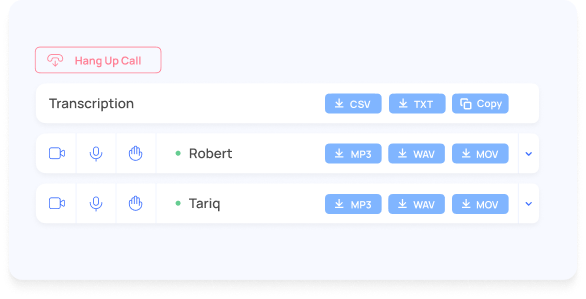
When you choose English, a transcription will automatically be generated after you stop recording and will be available for download right from the recording page! Now available in .txt and copy to clipboard in addition to .csv!

Lastly, you can run transcriptions on any past recording! This means you can transcribe all recordings you’ve ever made on Zencastr easily!

What’s Coming Next For Transcriptions?

While transcriptions are only available for English recordings today, we hope to release transcriptions for additional languages in the future. We are also working on updates that will turn your podcast transcripts into a crawl-able and SEO-friendly format. What would you like to see next with our transcription service?

Ready to Try Transcripts?

If you are on a professional plan, just login to your Zencastr account and start recording! Not on a professional plan? Sign up for a 14-day trial to test out how you could put transcriptions to work for your podcast today!

Read more about Transcriptions here!

Posted on October 7, 2021 .

Introducing Smart Filters: Remove Long Pauses

So What’s New?

At Zencastr we aim to make the podcast creation process simple and accessible so that creators can spend less time editing and producing their content and more time growing and connecting with their audiences.

Remove Long Pauses

We are proud to announce a new suite of tools in our Postproduction feature that make editing easier - Smart Filters! Today we debut the first Smart Filter, Remove Long Pauses, available now to all users! 

Group 2371.png

Whether you're a podcast producer or edit your own show, Remove Long Pauses will save you a ton of editing time by removing dead air from your podcast automatically based on time criteria you define. Early testing from our team indicates that between 3 to 7 minutes will be edited out of an average 30-minute podcast by removing long pauses, making your content more succinct and impactful and your manual editing less time-consuming and repetitive. It recognizes long periods of ambient noise like phone notifications and keystroke typing as pauses and will remove these too.

Postproduction with Remove Long Pauses.png

Want to learn more? Read how to enable Remove Long Pauses when running a post-production on your podcast recording.

And look out for more announcements from us over the coming weeks as we plan to add more audio and video Smart Filters to further simplify your podcast editing process!

Posted on September 16, 2021 .

Are you using these podcast growth hacks?

How are other creators promoting their podcasts? We’ve tallied up your votes and growth insights from last week and featured some of the most impactful responses. Check out how your peers are growing their podcasts with this infographic. Click the image to view the full PDF.

Posted on September 1, 2021 .

Announcing New Podcast Editing Features!

We are excited to announce a podcast editing and post-production update to the platform! The team has released a vastly improved audio and video podcast editing tool to both our Audio and Video post-production systems. The quality and speed with which we can process audio and video mixes have taken significant strides forward, and we’ve added new options in the Video post-production system, detailed below.

New Video Layout Options are Live! Two new video layout options in post-production give you more choices for how you want your podcast to look and also can be used to improve the shareability of your content.

autofacecropfinal.png

Auto Face Crop - Centered Faces are better!  :) 

Zencastr designed its facial recognition technology specifically for podcasting to pick out participants’ faces in the original videos. Once selected, Auto Face Crop trims the right and left margins so that each participant appears in the middle of the screen. 

verticalgridfinal.png

Vertical Grid - Perfect for mobile! 📱

The Vertical Grid layout uses your original videos and stacks them vertically. This is perfect for quick video podcast exports. Whether you’re sharing clips from your episodes to social media platforms like Instagram, Tiktok and IGTV, Zencastr’s vertical mix is a perfect way to lay out your content.

standardgridfinal.png

Standard Grid - Standard video display with updated post production magic! 🎥

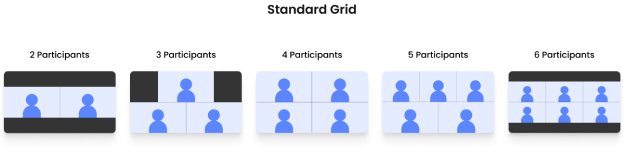
Standard Grid, the original video format, now can be used with more participants. It keeps videos as originally recorded and places them side-by-side in a horizontal orientation for up to 6 total participants. Standard Grid layout is perfect for Youtube and other video viewing platforms. 

Reminder: You need to use Zencastr post production to get access to these features! 

We can’t thank you enough for choosing to use our platform and we look forward to delivering many more user-focused content solutions over the coming months!

Posted on June 17, 2021 .

Announcing New Recording Modes


recordingmodes.png

You asked for it and we have heard you. As of yesterday, all Zencastr users now have the option to toggle into their preferred podcasting mode before recording their episode. We want Zencastr to be a first class experience for video and audio-only podcasts alike.  This feature was built for those who aren’t yet ready to start recording video or those who simply want to view their guests but record audio-only.  To our long-time creators, thank you for all your feedback as we love to listen and are committed to continually building to solve the pain points our creators face. 

You can check it out by creating a new episode from your Zencastr dashboard

 Still, have questions? Our fabulous support team put together this document to walk you through the product changes with video examples

We can’t thank you enough for choosing to use our platform and we are excited to deliver many more user-focused content solutions over the coming months. 

Posted on March 11, 2021 .